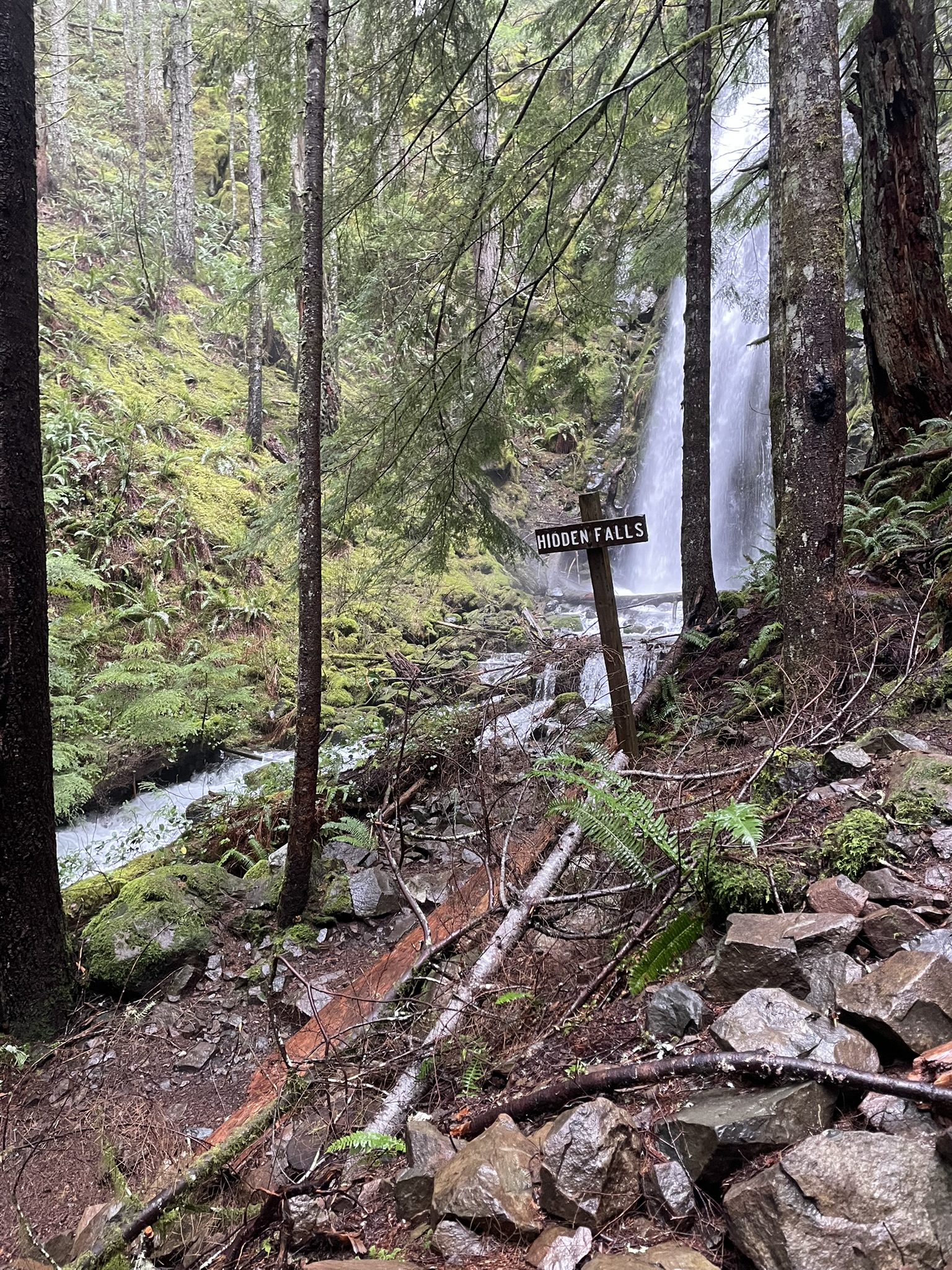
Hidden Falls via Tarbell Trail

Hidden Falls lies about 5½ miles along the Tarbell Trail, starting from the northern-most trailhead, which sits by an isolated parking lot.  If it’s a busy day there may be one or two other cars sitting along the Washington DNR’s signature-style pit toilet.  Other than that your interactions with others might be limited to the sight of a logging company’s trucks passing through in the summer.

The Path to Hidden Falls

After you take the short access trail from the parking lot onto to the trail you’ll be guided deep into the Yacolt Burn State Forest.  Nearly all of the hike’s vertical climb is in the first two or so miles, on the way to the peak of Kloochman Butte.  Soon enough though, you’ll be riding on the edge of the Yacolt Forest while heading down into a small valley that safeguards the falls.  You’re first few sights of water will be a mile or so out, but soon enough you’ll wrap around to the sight that made the entire hike worth it.

A photograph of Hidden Falls flowing fast during peak season.

Hidden Falls, which lies just along Tarbell Trail, in the Yacolt Burn State Forest.

The hike to Hidden Falls is usually around 11 miles round trip, with moderate elevation gain (which is inconsistent to say the least).  There is also very limited cellular connectivity in most of the Yacolt Burn State Forest, especially this far in, that said GPS coverage is pretty good, even in the thicker coverings of the forest.  All of this is to say that Hidden Falls might not be the best hike for beginners, if you are in or around Clark County there are plenty of amazing hikes in the area (maybe check out Bell’s Mountain Trail if you’re looking for an easier hike.)

The falls themselves are certainly hidden, I have hiked this exact path with friends and family about four times as well as an entire full-length backpacking trip of the entire Tarbell Trail, and I’ve only seen a total of two or three other people in this exact spot across all of those trips.  Most of these people seem to drive up to it through L-1182 on Jeeps, so you likely will not find anyone else on the trail.

Getting To The Trailhead

From Moulton Falls Regional Park head to NE Sunset Falls Road, then take a right onto NE Dole Valley Road, finally, take a left onto L-1100 Road the trailhead parking lot will be to the left of you.  Make sure to watch out for aggressive drivers and be safe driving, a lot of drivers take the turns too fast and there are some pretty narrow roads.

Map Data


Feel free to also download the data (GPX) from this map for your GPS unit.  I compiled it using GIS information from Clark County’s Open Data program.

Posted in Trail Guides | Tagged | Leave a comment

Bell’s Mountain Trail

Bell’s Mountain Trail is one of my favorite hikes in the Yacolt Burn State Forest for taking people who have little to no hiking experience. The trail is open to foot, bike (non-motorized), and horse traffic, so you’ll see plenty of different types of people here.  I have never seen a horse on Bell’s Mountain trail, but keep an eye out.  Also watch out for the adventurous trail runner making the attempt upwards and the daredevil of a mountain biker coming down.  Typically the regulars of this trail, and the surrounding ones, are super nice and welcoming.

The trail itself isn’t too difficult, you get most of the elevation gain out of the way within the first mile after the junction, with an average grade of 3.1%.  Take it easy and slow, there is certainly no rush to get to the top.  The views through the border of the Yacolt Burn State Forest are amazing.

Seasonal Information

The trail’s peak season is certainly in the summer. The lush green grass and trees fill lookout spots as flowers grow along the trail.  The rain and clouds are typically a little calmer in the summer.  All that said, pack extra food and water on hot days.

From late fall and onward, low-hanging clouds and fog begin to mask a few of the viewsheds.  However, fungi and flora begin to replace where there where once wildflowers.

In late winter snow begins to cover the mountain.  While the snow makes the trail moderately more difficult, it also makes the trail super beautiful.  Also, I may be guilty of having dragged a friend or two up the mountain in the middle of winter.

Bell’s Mountain in the Winter

Be prepared for partial connectivity throughout the entire hike.  The region’s signature rain-filled and cloudy days certainly play a part here, and you aren’t likely to get a quick GPS acquisition at the base and cell coverage is reasonably spotty.  Also pack extra food and water, especially in the summer heat.

Getting to the Trail

The Bell’s Mountain Trail is a junction along the East Fork Lewis River Trail, which is a short and well-maintained asphalt walkway, that connects, on one end, to the Moulton Falls Regional Park and, on the other, a typically empty parking lot.

Most people coming here take NE Lucia Falls Road, which leads to Moulton Falls, but if you choose to go this route be prepared for aggressive drivers that take corners too quickly and to yield to bikers.  Although, if you choose the other route, the roads to the empty parking lot are pretty narrow, so just go slow and be cautious.

History & Interesting Facts

Bell’s Mountain is named for John Bell, who moved with his family from Iowa to the west side of Bell’s Mountain.  John Bell built a bridge that passed over the Salmon Creek, which flows from the Yacolt Burn State Forest into Hockinson, WA and out into Vancouver, WA where it eventually reaches the Vancouver Lake, and other one in the Lacamas area.

Events & Popular Dates

I only know of two dates and events you should be aware of:

  • Every year there is a Thanksgiving Turkey Trot along the East Fork Lewis River, I’m unsure of the exact route.
  • New Years Day, people seem to make a New Year’s resolution to get outside and hike more so they usually seem to start with the 4 mile round trip East Fork Lewis River trail.

Map Data


Download the GPX file I created using Clark County’s GIS data for your watch or GPS unit.

Posted in Trail Guides | Tagged , | 1 Comment

“Earning” Fitness

Recently, I did a morning run, one that I considered long for myself. Afterwards, like any other runner, I dove into those statistics and numbers. I have an Apple Watch, so I have to go through a bunch of different apps depending on what I want to see, and Apple Health provides a few of those. As I was scrolling through the “highlights,” they’re supposed to be quick information bits of information about your current health and fitness level – they’re kind of useless, section I notices this card:

Screenshot from the Apple Health app showing the average exercise minutes earned trend.

Screenshot of Apple Health’s average exercise minutes highlight.

Supposedly, I have “earned” more exercise minutes than last year. I wasn’t surprised to see the numbers, I wasn’t as good of a runner in 2024, but I was surprised with the wording.

This gamification of health and fitness is a long term trend that I’ve noticed a lot of health tracking companies, particularly Apple, embrace over the past couple of year.  Now, I understand, and partake in, setting goals for fitness, but a lot of the fields that the Apple Watch allows you to set goals for don’t make sense to the average person.  For an example, the Fitness app reads some basic data from the watch to create daily statistics called “rings.”

Screenshot from the Apple Fitness app showing the Activity Rings section.

Screenshot of Apple Health’s average exercise minutes highlight.

For those who don’t have an Apple Watch activity rings are Apple’s way of doing daily goals. You have three categories: move, exercise, and stand. Move is the number of active calories you have burnt, exercise is the number of minutes you have been sufficiently active for, and stand is the count of hours in which you have stood for at least one minute within. Now, since I got my first fitness tracker, a bright orange Fitbit Charge HR, I have really enjoyed the idea of daily goals, it seemed like a really unique perspective that only a device which actively tracks your health and fitness could do, but, these metrics don’t feel meaningful to me.

First off, the default values don’t make sense, in the screenshot above I have changed them to best match the publications on health and fitness that I have read, but how they’re measured also don’t make sense.  For an example, according to the Harvard Heart, we should, for ideal heart health, get at least 30 minutes of moderate-to-vigorous activity per a day and stand for, at least, 2 total hours within a day.  They also found that more vigorous work could be substituted for less vigorous work, so a 20 minute jog counted as multiple minutes of standing.  

I think that this is a crucial part that most fitness platforms don’t seem to get right, health doesn’t look the same for any two people. In fact, health doesn’t look the same for the same person on any two days, people who are frequently active are supposed to have a day of rest to allow the body to repair itself. On these days Apple Health frequently tells me “you’re burning less calories than you normally do at this point,” which, given that exercise is addictive (which is an emerging field of study with many different classifications and looks very different depending on the person) these kinds of prompts from an app do nothing but promote those ideas.

There is one platform, Garmin Connect, which I think does this idea of goals correctly. It’s equivalent of active minutes is on a weekly basis, and other daily goals are digestible and easy to understand (ie. steps, sleep, etc.), which, in my opinion, is a healthier balance. Garmin Connect doesn’t provide health “warnings” or bombards you with “trends,” now that does mean you have to know where to look for features that may be hidden away and discovery is harder. Now, I do have complaints about Garmin Connect, but those are for another time.

Screenshot of Garmin Connect's weekly intensity minutes view.

Screenshot of Garmin Connect’s intensity minutes feature.

I’d also like to praise HealthFit, my personal favorite fitness app, which provides very detailed statistics, with explanations and sources on how they are calculated, what they mean, and how you can use them, but no praise or critiques about your trends or history.

I think that this is a good overview of where I feel the state of health and fitness app user experience design is going: telling you if you are doing good or bad, with no context on who you are or what is going on around you. I really don’t like the idea of this, I feel that fitness platforms should aggregate the data that helps you better understand what is happening in your life and body, not what should be happening or where your goals should be. After all, goals and life changes, and that’s fine, and getting stressed out over what an app tells you isn’t going to help at all.

Also: I’m currently working on a self-hosted fitness platform, it’s just an experiment right now and we’ll see where it goes, but if you have any comments on where you think that should go feel free to reach out to me.

Posted in Health & Fitness | Tagged , , | Leave a comment

Panic at the SPA!

I began programming in 2015, now that’s not that long of a time, but coming on my 10 year anniversary I feel that it’s long enough that I can sit on my high pony and talk about the what the “good old days” where like. Really, it was the best of times, it was the worst of times, it was the age of PHP, it was the age of AngularJS. Considering that the best option for writing a SPA was AngularJS, and that no mere mortal would dare to recommend that a beginner learn that ghastly web framework, I existed in a programmer’s natural habitat: writing PHP in Notepad++ “hosting” L/WAMP on the LAN.

Soon, in a year or two, React would “get good” and then came the dark ages. I learned React late, it became appealing to the young and stary-eyed me who found out about GitHub Pages, free hosting (yay), and got tired of jQuery, .NET, and PHP in 2020. See when Elvis Presley sang “(You’re) The Devil in Disguise” he sang it about React, which (in my humble opinion) is the sole creator of the nine circles of Hell.

State-caused PAnic

In the real world, we’d use document to access the DOM. In React, like most SPA frameworks, the state of the application and the DOM are bound together. Developers often see this as a huge help in getting their applications off the ground, but as the complexity of the application grows (and the amount of things stored in the state of the application increases) keeping the unbearable weight of the DOM and state love story begins to make you wish that they could end up drinking alone.

The issue with DOM and state being managed together is that poorly written state logic, which is written in JavaScript or TypeScript mind you, can cause an overwhelming amount of pricy operations. React’s design of effects, and how components and hooks interact with one another in general, sets no unsuspecting developer up for success in this cruel and unfortunate world where memory leaks do in fact exist.

SPAs*

*with routers

How many pages does your single-page application have? If you answered more than one you might just be cooked. See, HTTP natively supports several pages and, if you hadn’t chose to use a SPA, you, probably, wouldn’t need to touch window.location.href, #, or query strings in order to create the illusion that there are several pages for your application.

Before my personal age of enlightenment I too was foolish, I figured that building a router for my applications was normal – and seemingly had no drawbacks. The truth is that the web was built around the idea of every page being an independent file. Not following this convention breaks your application’s compatibility with other services and tools – such as those for SEO and accessibility.

Performance

With many SPAs everything is rendered by JavaScript. There is some “optimization” that can be preformed, such as Next.JS’ Server Components that will render HTML on the sever, and it might not even be that bad – if you can figure out how to properly host Next.JS without using “the edge.” To chase more optimizations developers can setup hydration systems, allowing their servers to render even more of the content. Although this is simply more complexity on top of the already complex frameworks allowing developers to create SPAs, and produces feelings of déjà vu for AJAX. Plus, JavaScript on the server was a mistake and makes the operations that the server preforms, such as server components and hydration, more costly.

Tooling

If JavaScript on the server was a mistake now what does that make JavaScript on the desktop? A mistake. Okay, I’ll ignore Electron and React Native for now, maybe I’ll discuss how “true” desktop application development is down the drains as well in another post.

In most languages there is a single set of tools, but JavaScript isn’t most languages now is it? We have been graced with the presence of npm, the tried and true classic fork in the eyeball, and everything else which is faster but hasn’t taken off, yet. I’m not saying that these tools are exactly the worst things to happen to this universe, but giving developers (a naturally lazy species) a shorthand (npm i) to add external dependencies to their applications might be a close second.

Also, newsflash, JavaScript is an inefficient language, it was never made to be compiled – let alone to compile itself. Yet here I am in 2024 pondering the profound state of the micro-optimization differences between bun, yarn, and npm just to figure out the best way of creating a new web app.

NPM

By this I mean the npm Registry. Look at left-pad, a “micro-package” which aids in the difficult task of adding a set number of strings before other strings. For the unaware this thing made it into React’s codebase and, when left-pad broke, rendered React unusable. This might sound like an isolated incident out of humor, but it’s just the JavaScript lifestyle.

There’s no logical reason for us to even have the term “micro-package.” If it’s so small that it’s “micro-” just throw it in a utils directory and never think about it again and, no, node_modules does not count as your utils directory.

Can’t we just get a good wheel?

The nice thing about standards is that you have so many to choose from.

– Andrew S. Tanenbaum (Computer Networks, 2nd ed.)

I guess this is the issue with SPA. There are so many frameworks, all vastly different in behavior and convention, mostly due to the fact that it seem that everyone’s JavaScript is different. The language on a whole has set the mass migration to it up for failure, there aren’t even well-accepted standard styles, I mean I still don’t even know if I’m supposed to use two or four spaces!

It feels like we’ve made four thousand wheel, axel, body, and engine types but none of them fit on each other. The automotive industry is more interoperable than this!

That’s all folks!

Well, thanks for wasting your time with me. I spent a lot of time on this actually spent a lot of time on this so I hope you had fun reading it, but if you hated it you can direct the hate mail to my email – same thing for all the love letters. If you always make SPAs I urge you to try something different, maybe give PHP a shot, and if you haven’t made a SPA before maybe try making one.

Posted in Programming | Tagged , | Leave a comment

A Quickstart Guide to Privacy

Edit (October 28, 2025): This post is from Aug. 2023 (that’s over two years old at this point), a lot of things have changed since then.  I’m keeping it up just for the sake of things.  For pretty good, and easy, advise to follow check out Privacy Guides.

Nowadays it’s nearly impossible to like there’s no hope to avoid all of the prying eyes in the world. While, sure, you could ditch your phone, buy a third-generation Honda Civic, and never touch the internet again, but where’s the fun in that? This guide is intended to be a quick, not-so-deep, guide on having a little more security and privacy online. Finally, this guide is going to be biased, it’ll talk about the services I use, and maybe even have a referral link or two.

Web Browsers

What better place to start than where all of your online interactions begin: the web browser. For this category I recommend Firefox, just as a heads up try to get the “enterprise” option (it’s free) if you don’t need (or want) all the features (I got the non-ESR version, spent all the time configuring it, and now wish I hadn’t), once you have it installed spend some time to configure everything, here’s a step-by-step process that I typically follow:

  1. Close all of the random tabs that open.
  2. On the new tab page click on the cog (settings icon) and disable:
    1. Shortcuts
    2. Pocket
    3. Activity
  3. Right click on all of the preset bookmarks and remove them.
  4. Now click on the hamburger (three lines/more) icon and open settings.
  5. Configure the general settings to your liking, for the most part they will not impact too much.
  6. Now go to the “Home” settings, make sure all are off other than “Web Search”.
  7. Go to “Search.”
    1. Make sure that the “Search Bar” is set to the first option, this looks a bit cleaner and is easier to use, if you want a more “classic” look use the second.
    2. Select a search engine (I’ll talk more about these in a bit).
    3. Remove all of the bogus extra search engines in the “Search Shortcuts” sections.
  8. Go to “Privacy & Security.”
    1. Set “Enhanced Tracking Protection” to “Strict.”
    2. Enable the “Do Not Track” (DNT) header/signal.
    3. Disable “Ask to save logins and passwords for websites,” you shouldn’t be using your browser’s built-in password manager, if you want to risk it (remember: here be dragons) at the very least enable “Use a Primary Password.”
    4. Disable autofill (again, if you wish to risk it, here be dragons).
    5. Next, scroll to “Address Bar” and disable “Open tabs” (with this on, Firefox likes to show your currently open tab in the suggestions and you can accidentally switch tabs). Also disable “Suggestions from sponsors” and “Improve the Firefox Suggest experience,” I also recommend turning “Suggestions from the web” off.
    6. Now turn everything off in “Firefox Data Collection and Use.”

Add-Ons

This is where stuff gets fun, up next is blocking those paywalls which we’ll use two add-ons for:

  • Bypass Paywalls: For a large number of sites, click on “Download and install the latest version” on the GitHub page.
  • Medium Unlimited: Specifically for Medium.

Alrighty, time for the random add-ons:

  • Dark Reader: Dark mode for all the sites.
  • FediRedirect: Redirect from one fediverse instance to another.
  • LibRedirect: I would recommend this one, but the additional configuration required may be a bit much for some beginners. It will redirect sites that track or require an account to alternative frontends which don’t do such things.
  • NoScript: Another one that I would recommend for more advanced users, it automatically blocks JavaScript for websites and allows you to trust sites you, well, trust.

Finally, you’ll want to start with an ad-blocker of which I recommend two: uBlock Origin and AdNauseam. They do the same thing (in fact AdNauseam is based off of uBlock Origin) but with different approaches. uBlock Origin is a more traditional ad-blocker as it simply stops the from loading, so you don’t see them and no-one gets money, whereas AdNauseam clicks (silent in the background) on every single ad spending advertiser’s money, messes up Google’s algorithms, and generates “noise” (essentially confusing trackers). Depending on which option you choose you’ll need to take some additional steps:

Additional Steps After Installing AdNauseam

Go back into settings and reset “Privacy & Security” > “Enhanced Tracking Protection” to “Standard”. Next, click on the AdNauseam icon and click on the cog icon and follow the “installing either” steps bellow.

Additional Steps After Installing uBlock Origin

Install Privacy Badger, which “learns” to block trackers as you browse the web. Next, click on the uBlock Origin and then the three cogs and follow the “installing either” steps bellow.

Additional Steps After Installing Either

Go to the “Filter Lists” tab and open the “Annoyances” section. Enable the “Fanboy Annoyances List” and “Fanboy’s Social,” the first will block pop-ups (including cookie-related ones) and the second will block those annoying “share” buttons on random sites.

Search Engines

The search engine I recommend is SearXNG, it’s hosted by it’s community, if you don’t know where to start you can pick an instance off of searx.space, or you can go with one of the more popular options: searx.be.

Alternatively, many recommend Startpage, I’ve never tried it, but you may like it better than SearXNG.

To add it to your list of search engines click on the address bar and click on the site’s icon with the green plus. To set it as your default navigate to the Firefox settings go to “Search” and set the “Default Search Engine.”

Password Managers

Remember when I said that using your browser’s built-in password manager isn’t good? Let’s look at the alternatives, of which I’ve used two: Bitwarden and Dashlane. Although both have free plans, if you want extra feature like 2FA you may need to pay a subscription. Alternatively, and this is the option I opt for, is self-hosting Vaultwarden (a fully free and open-source, FOSS, alternative server for Bitwarden). Both have browser add-ons for auto-fill and mobile apps.

Communication

Nowadays we spend a lot of time communicating online, so I figured it was important to include in this quickstart guide (even though I wanted to keep it short).

Instant Messaging

Likely one of the more popular forms of communication online is instant messaging. There’s a good number of privacy-centric instant messaging services out there, although I personally have used two: Matrix and Signal. I enjoy both, but gave up on Signal as it just didn’t really suite my fancy. Signal seems to be very popular, it’s the closest to WhatsApp or texting, although if you’re particularly looking for something private and secure (which this guide is likely not for you) it does require a phone number for registration, on the plus site it does support E2ee (end-to-end encryption) and the protocol is open-source. Alternatively, Matrix is the one I enjoy the most, it is closer to Discord or IRC, you’ll need a client and homeserver to be able to setup with it, both are easy to find, you can find clients here, and here’s a list of homeservers I’ve found:

  • matrix.org: The default for Element, many don’t love it as it as they have concerns about one party controlling the protocol too much (so maybe look into the alternatives first).
  • matrix.catgirl.cloud: You need to fill out a registration form in order to sign up. Hosted in Germany.

Social Media

Alright, I’m gonna try to keep this section pretty short. Basically, all of these social medias use ActivePub (A.K.A. the “Fediverse,” where all are interconnected):

  • If you’re on YouTube: PeerTube (instances).
  • If you’re on Twitter: Mastodon (instances).
  • If you’re on Tumblr: Firefish (instances).
  • If you’re on Reddit: Lemmy (instances).

Remember, because this is ActivePub you should be able to see PeerTube content on Mastodon, and Firefish users should be able to see your Mastodon content, so just go with the interface you’re familiar with. The only one that doesn’t play too nicely with it yet is Lemmy (I’m sure this will change as all of ActivePub is pretty new – hype-wise, it’s actually been around since 2018).

Email

For those who don’t know email is a federated messaging system, but you likely already knew that (because it will not freaking die for some reason, and we just keep sending a heck ton of embedded junk using it). That being said odds are you’re likely using Gmail or Hotmail/Outlook and that’s not great, considering if you’re reading this you likely don’t want Google and Microsoft in your life anymore. There are two email services that I recommend, those being Skiff and Proton. Out of the two I use Skiff, it allows you to have free email on a domain name, has a much cleaner interface, and I (personally) just like it better, that being said it doesn’t support IMAP (yet) and seems pretty early in development. Proton on the other hand has a lot more features (like a VPN and password manager) along with IMAP support for paying customers. Honestly, give both a try and feel out which one fits your needs the best.

Heads up: Although both are E2ee that doesn’t mean they’re secure, email is not a secure protocol, if you’re doing something important that requires messages to be secure use Signal or Matrix.

Most email providers support “automatic email forwarding,” so you don’t event need to switch account or anything.

Update 2023-8-14: Alright, same day as this post, Skiff has sent out a newsletter which mentions auto-forwarding for Outlook and Gmail. Now if you use either one you can setup forwarding right within Skiff settings.


Finally, thank you for reading this post, I hope you found it helpful (in some capacity). If you have comments or questions reach out to me.

Posted in Technology | Tagged , | Leave a comment

Setting Up a Blog With Jekyll

This guide will set you up with everything you need to create a brand new blog with Jekyll and GitHub Pages.  All you’ll need is a GitHub account and a machine running Ubuntu or Debian.  

Installing Ruby

To get started install Ruby on Ubuntu or Debian, it’s included by default within Ubuntu’s repositories.  If you run into issues check out Ruby’s website, otherwise just use these two commands:

sudo apt update
sudo apt install ruby-full

You’ll also want to add these lines to your shell profile (e.g., .bashrc) so that you can access all the commands you’ll need:

export GEM_HOME="$HOME/gems"
export PATH="$HOME/gems/bin:$PATH"

Then load the new shell profile, the easiest way to do this is relaunch your terminal.  

Installing Jekyll and creating the blog

We can now use Gem to install Jekyll using this command:

gem install jekyll bundler

Next, we can create the new blog using what we just installed:

jekyll new blog

Now, let’s make sure that everything runs okay! To do this we’ll start a simple testing server with:

bundle exec jekyll serve --livereload
💡 If you encounter: Unable to load the EventMachine C extension; To use the pure-ruby reactor, require 'em/pure_ruby'

You can likely fix this error simply by reinstalling the event machine:

gem uninstall eventmachine
gem install eventmachine --platform ruby
bundle exec jekyll serve --livereload

Publishing

Now that we have a fully functional blog we can publish it using GitHub pages. To do this we’ll use GitHub CLI to create a repository, the tool can be installed on Ubuntu and Debian (amd64) derived distributions like so:

curl -LO https://github.com/cli/cli/releases/download/v2.12.1/gh_2.12.1_linux_amd64.deb
sudo apt install ./gh_2.12.1_linux_amd64.deb

Now we’ll need to create a Git repository in our blog’s directory by running git init and create a commit with:

git add . && git commit -m "initial commit"

and we can create a repository with gh repo create. Now we can navigate to our repository’s settings on GitHub and enable GitHub pages.

Custom Domain

If you have a custom domain name you can create a CNAME record in your DNS that points to YOUR_USERNAME.github.io and type in your domain name in the “Custom domain” section of GitHub page’s settings.

Congratulations! You know have a fully function and public blog running! Thank you for checking it out!  Happy publishing!  

Posted in Hosting | Tagged , , | 2 Comments